|
1
|
- Presented by: Howard F. Arner, Jr.
Client Server Development, Inc
- hfarner@SQLThing.com
|
|
2
|
- SQL is the language of the web
- Most AS/400 system are developed around record level access
- Making reliable and scalable SQL statements against these systems
requires a consistent design methodology
- This presentation will illuminate a development methodology that
delivers consistent performance and scalable queries in your distributed
applications
|
|
3
|
- Most programs….
- We used to say 95% of our programs were getting data out of a file and
putting it on the screen or vice versa
- With the web, this is still true
- Just more garbage in the middle!
- Data access plays a central role to this
- Presentation formatting is a processor intensive operation on the web
server
- Data access is an expensive operation because the web server must
communicate with a separate system
|
|
4
|
- By ensuring consistent data access performance, we eliminate the data
sources as a bottleneck and ensure scalability
- If the performance of the data access is known, performance problems
must be in another portion of the application
- By taking a data centric approach to development, we cure performance
problems before they can appear thus easing the QA process
|
|
5
|
- Identify data inputs to the target program
- Gather information about the target physical files
- Construct SQL statement to gather data
- Verify statement performance/access plan
- Benchmark statement
- Save/Paste to development environment
|
|
6
|
- Ensure that you understand which elements need to come from the AS/400
- Get a list of physical files where each element appears
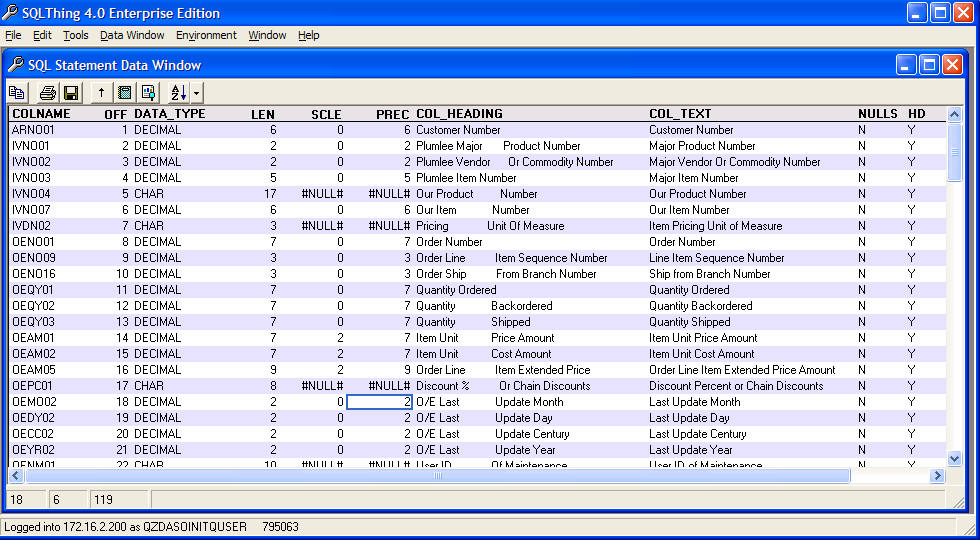
- Generate a columns report for the physical files so that you understand
the data types for the target elements
- Identify transformations of data
|
|
7
|
- The following query can be used to retrieve the columns in a table. Note that it uses parameter markers
- SELECT TRIM(COLUMN_NAME) AS COLNAME,
- ordinal_position AS OFF,
- TRIM(data_Type) AS DATA_TYPE,
- LENGTH AS LEN, numeric_scale AS SCLE,
- numeric_precision AS PREC,
- TRIM(ifnull(column_heading,'')) AS COL_HEADING,
- TRIM(ifnull(column_text,'')) AS COL_TEXT,
- is_nullable AS NULLS,
- has_default AS HD,
- system_column_name AS SYSCOL
- FROM qsys2.syscolumns
- WHERE table_schema = ? AND
- TABLE_NAME=? ORDER BY OFF
|
|
8
|
|
|
9
|
- Sometimes, the data on the AS/400 is not the data you want on the client
- Example, Java does not like Decimal as they are an immutable type. If
the target needs to manipulate the data, plan on doing a cast in the
select statement to a better numeric type
- Decimal(3,0) might map to smallint
- Decimal(12,2) might map to double
- Decimal(6,0) might map to integer
|
|
10
|
- Chars waste space
- Example, you have a CHAR(40) on the AS/400 but most of the entries are
20 characters or less
- The AS/400 sends CHAR(40) as 40 characters, padded at the end with
blanks
- Minimize the amount of transmitted data by trimming character fields
before transmission
|
|
11
|
- Dates may be in a legacy format
- Example: a system stores an invoice date as DECIMAL(2,0) Century,
DECIMAL(2,0) Year, DECIMAL(2,0) Month and DECIMAL(2,0) Day.
- If the client intends to manipulate the value as a date, do the
transformation on the 400 prior to sending the data to the client
- Some clients can not understand the full range of an AS/400 date, fix
up these dates before sending to the client
|
|
12
|
- Identify any user defined functions you may wish to create to transform
data
- If you constantly need to send legacy dates back as SQL Dates, consider
writing a function to do the transformation on AS/400 so that you have
re-usable code
- If you need to do special calculations, like percent to total or such,
write a UDF to do the transformation with full error handling to ease
the code on the client
|
|
13
|
- CREATE FUNCTION SQLTHING.MINCRON_DATE
- (CEN DECIMAL(2,0), YR DECIMAL(2,0),
- MO DECIMAL(2,0), DY DECIMAL(2,0))
- RETURNS DATE
- LANGUAGE SQL
- BEGIN
- DECLARE F_OUTPUT DATE;
- DECLARE F_TEST INTEGER;
- DECLARE CONTINUE HANDLER FOR SQLEXCEPTION
- SET F_TEST=1;
- SET F_TEST=0;
- SET F_OUTPUT = DATE( TRIM(CHAR(MO))||'/'|| TRIM(CHAR(DY))||'/'||
TRIM(CHAR((CEN*100)+YR)));
- IF F_TEST=0 THEN
- RETURN F_OUTPUT;
- ELSE
- RETURN NULL;
- END IF;
- END
|
|
14
|
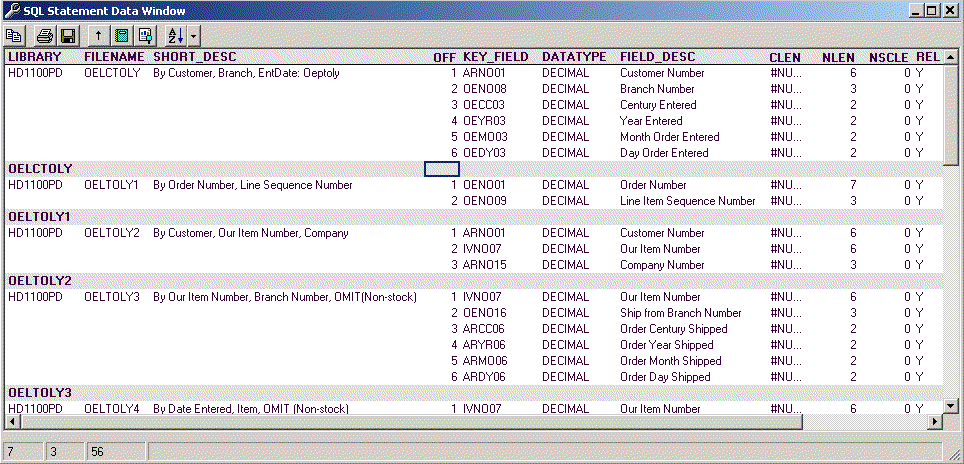
- For each physical file, generate a list of logicals that can be used in
the resolution of the query
- Look at the selectivity of the logical file to determine it's
suitability for the query at hand
- Understand the implications of join order and the types of joins being
used
- Understand the null status of the fields in any grouping or join
statements
|
|
15
|
- SELECT trim(DBFLDP) AS LIBRARY,
trim(DBFFDP) AS FILENAME,
- trim(DBXTXT) AS
SHORT_DESC, DBKPOS AS OFF,
- trim(DBKFLD) AS KEY_FIELD, DBITYP AS DATATYPE,
- DBITXT AS FIELD_DESC, DBICLN
AS CLEN,
- DBINLN AS NLEN, DBINSC AS NSCLE, DBXREL AS REL,
- DBkORD AS DIR, dbxatr AS TYPE,
- (CASE dbxunq WHEN 'U' THEN
'Y' ELSE 'N' END) AS UNIQUE
- From QSYS.QADBLDEP
- LEFT JOIN QSYS.QADBXLFI
- ON (dbffdp=dbxfil AND
dbfldp=dbxlib)
- LEFT JOIN QSYS.QADBKATR
- ON (DBFFDP=DBKFIL AND
- DBFLDP = DBKLIB AND
- DBFRDP = DBKFMT)
- LEFT JOIN QSYS.QADBIATR
- ON (DBFFDP=DBIFIL AND
DBFLDP=DBILIB AND
- DBFRDP=DBIFMT
AND DBKFLD=DBIFLD)
- WHERE dbflib=? AND dbffil=? AND
DBXATR IN ('LF','IX') AND dbxrel='Y'
- ORDER BY FILENAME, OFF
|
|
16
|
|
|
17
|
- On my web site, download the index listing spreadsheet
- This Excel spreadsheet has a macro that you can use to gather a list of
logicals that can be used in the resolution of queries
- URL: www.sqlthing.com/SQLFAQ.htm
|
|
18
|
- Optimizer looks at statement to determine columns accessed, conditions
for retrieval, ordering and joins
- The more tables accessed in a statement, the more time this takes
- The more logical files over each physical file adds time to this
operation
|
|
19
|
- For each logical file
- Optimizer looks at index selectivity
- Determines cost of access path usage
- If cost < cost of previous path then
pop path to top of stack
- See if time is expired or check next logical
|
|
20
|
- Lots of logicals means lots of decisions
- Decisions take time
- Indexes typically evaluated in creation descending order
- Tables with a large number of indexes can cause optimizer to time out,
this can cause the AS/400 to not see the most appropriate access path
|
|
21
|
- SQL can use most logicals where the file is marked as relational
- However, SQL will rarely use logicals with select omit criteria**
- Join logicals are almost always a bad idea**
- Always initially select against the physical, do not name the logical in
the from clause
|
|
22
|
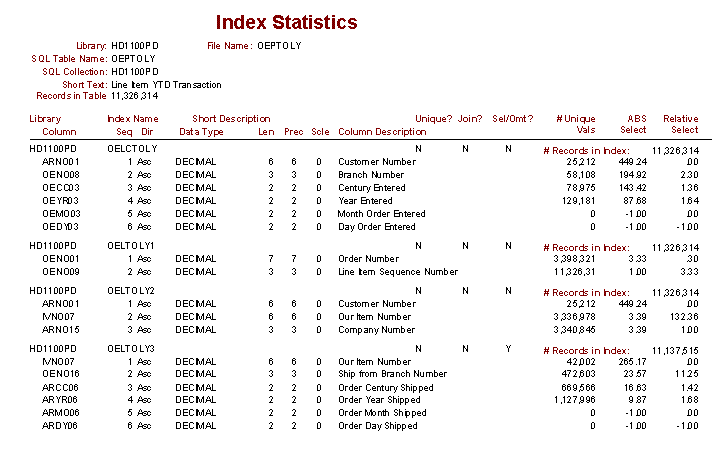
- The selectivity of an index controls whether the optimizer will think
using that index is a good idea
- Selectivity can be found by looking at the key loading information from
the DSPFD command
- Use my selectivity report, SQLThing Enterprise Edition, to understand
how selective an index is
|
|
23
|
|
|
24
|
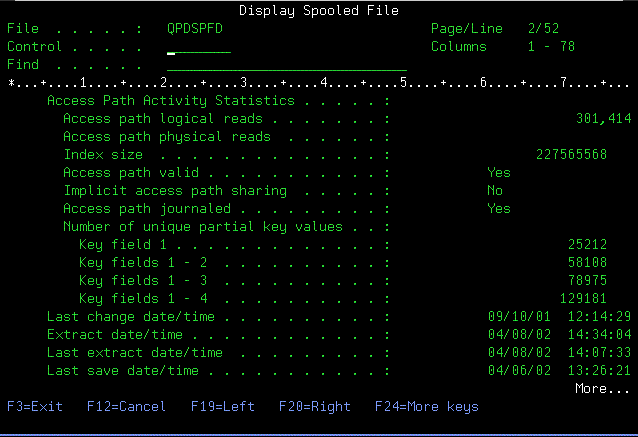
- You can also get selectivity information with DSPFD command against a
logical file or SQL Index
- Selectivity information comes from the Number of unique partial key
values field(s)
|
|
25
|
|
|
26
|
- Files have records. Indexes have
Keys. The selectivity of a key
indicates how many records will be returned, (on average), for one
instance of a key
- Selectivity can be skewed, for example a status field might have only
four entries, but a I status only occurs in one out of 10,000 records
- Understanding the selectivity of an index helps in planning queries
|
|
27
|
- Trucking company with 60,000,000 records in a physical file.
- 60 Logical files
- All logicals begin with company number
- 1 Company number
- All queries did not include where company = clause
- No logicals chosen to implement queries because left most key of
logicals was not used in restriction
|
|
28
|
- Create your query based on the fields and transformations required
- Use OPS Navigator or my freeware SQLThing tool.
- Create the query as it will be used in your application.
- If you are using replacement parms, then you must do the replacement
parms in the query
|
|
29
|
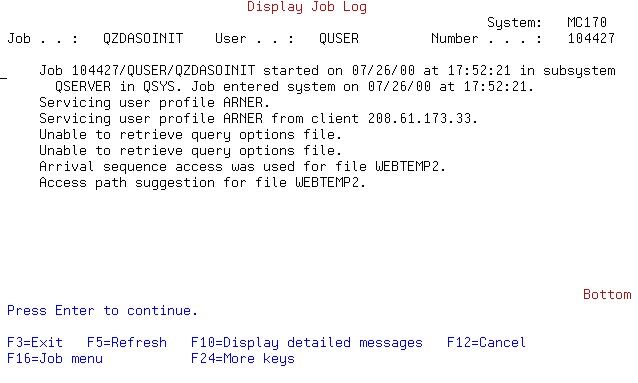
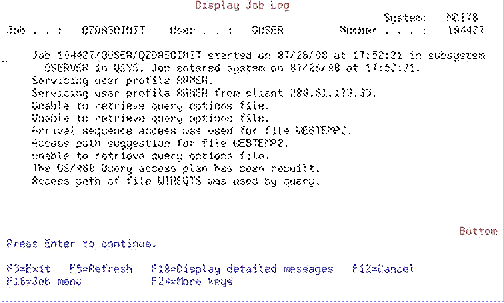
- Run statement with debug on to see optimizer messages
- Check prepare, execute and fetch times
- Verify that AS/400 is picking correct path
- Check for data type differences/access path rejection messages
|
|
30
|
- Given, a file called WEBTEMP2 which contains hits against my web site
- SELECT * FROM SQLBOOK.WEBTEMP2 WHERE
REQTS BETWEEN '1999-10-01-00.00.00.000000'
AND
'1999-10-01-23.59.59.999999'
|
|
31
|
|
|
32
|
|
|
33
|
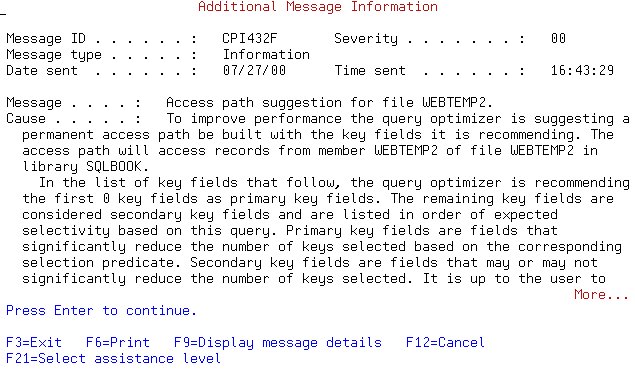
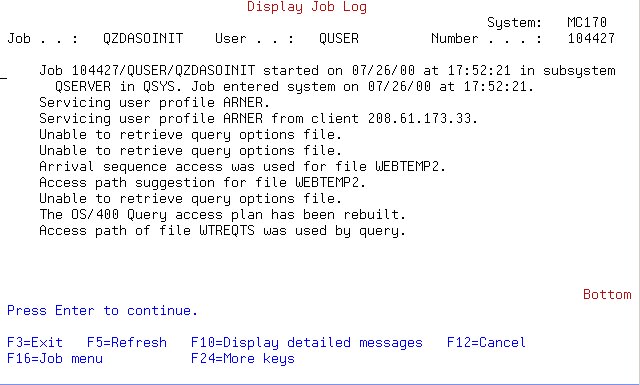
- The job log indicates an access path would help the query
- CREATE INDEX SQLBOOK.WTREQTS
ON SQLBOOK.WEBTEMP2 (REQTS ASC)
- Next, we run the query again and look at the log
|
|
34
|
|
|
35
|
- The important thing during validation is to assure that the query is
using a good access path
- Look at the throughput of the query and ensure that the Prepare, Execute
and Fetch phases are not taking a large period of time
- Look at the access paths considered, CPI432C message, to determine why
an access path was selected/rejected
- The following messages bear investigation
|
|
36
|
- SQL7919 - Data conversion required on FETCH or embedded SELECT
SQL7939 - Data conversion required on INSERT or UPDATE
CPI432E - Selection columns mapped to different attributes
- These messages indicate that you are comparing apples to oranges. This will preclude the use of an index
|
|
37
|
- CPI432A Query Optimizer Timed Out
- This is bad, as all access paths were not considered. The optimizer might have been one
path away from query nirvana.
- In this case, is the preferred path is not considered, try naming the
DDS logical in the FROM clause of the query. This causes the AS/400 to consider it
first.
|
|
38
|
- Running your statements using parameter markers allows you to implement
packages
- Packages are where the AS/400 stores the query information and the
access plan developed by the optimizer
- Optimization is expensive, packages cause static statements to be
compiled only once
|
|
39
|
- When packaging is on, optimizer will evaluate ALL access paths available
to a statement thus ensuring the “best” path is chosen.
- Access path is then added to package file
- Next time statement is executed, access path is retrieved from the
package and the expensive optimization process is avoided.
|
|
40
|
- If your application is using a lot of dynamic SQL, packaging will not
help
- Search is done by string length, so AS/400 can miss statements that are
the same though they have different lengths
- First optimization can be quite long due to exhaustive search
- To effectively use packages you must use parameterized statements
|
|
41
|
- Try using the OPTIMIZE for N rows
- Investigate using QAQQINI to set options for how queries are optimized
- Turn OFF treat constants as parameters
- Use OPTIMIZE_STATISTIC_LIMITATION to allow optimizer to "see"
more values in the logical files
- Use FORCE_JOIN_ORDER to force optimizer to link files in order named in
query
|
|
42
|
- You can copy the QAQQINI from QSYS into QTEMP using CRTDUPOBJ
- This way, settings will only effect your job
- Set options on QTEMP copy
- CHGQRYA QYROPTLIB(QTEMP) to tell job where to look for QAQQINI
|
|
43
|
- When you have the desired level of performance, you should save the
query
- Paste the query into the development environment
- Run the code and ensure performance is adequate
- Before code goes to production, run application with Database
Performance Monitor on and examine output
|
|
44
|
- The key to consistent performance is understanding how SQL will
interpret your queries and implement them on the AS/400
- The more information you have, the easier optimization of a query
becomes
- By taking a data centric approach, you eliminate data performance
problems in the beginning
|
|
45
|
- The remaining slides will deal with settings you can make on the AS/400
server that will effect client server processing.
- These settings can help JDBC, ODBC and OLEDB applications
|
|
46
|
- ADO uses the Connection Object to communicate with the AS/400.
- Like ODBC and JDBC, OLEDB talks to the QSERVER subsystem, (QUSRWRK on
V5)
- A connection causes a pre-start job, QZDASOINIT, to be used. The
QZDASOINIT job will stay alive until the connection is closed
- The QZDASOINIT job is returned to a pool, and then reused by a
subsequent connection.
|
|
47
|
- You can change how jobs are started and reused by using the Change
Prestart Job Entry, CHGPJE, command.
- On systems serving a lot of JDBC,ODBC and OLEDB activity, increase the
number of pre-start jobs available and manipulate the thresholds.
- Create a separate memory pool and change subsystem to use this pool.
Size the pool to eliminate/reduce page faults.
|
|
48
|
- The AS/400 has the ability to cache data.
- Using WRKSHRPOOL, look at the pools on your AS/400 system. Make sure the base pool is set to
*CALC. This turns on object
expert cache.
- Create a separate memory pool and load frequently used objects into the
pool using the SETOBJACC command.
This allows the object to be maintained in RAM.
|
|
49
|
- By default, QSERVER subsystem (QUSRWRK on V5), runs in the base memory
pool.
- Create a separate pool and adjust the subsystem description to run in
this new pool.
- Adjust the prestart job entries so that they run in the new pool.
- This segregates the memory used by ODBC, JDBC and OLEDB into a separate
space and reduces contention and fragmentation.
- Make sure you set the pool to *CALC with the WRKSRHPOOLS command so that
it uses expert cache.
|
|
50
|
- More information about the query optimizer can be found in DB2 Universal
Database for iSeries -Database Performance and Query Optimization
(Redbook from IBM)
- Download the free version of SQLThing to assist with your queries.
- www.midrangeserver.com
- Feel free to contact me, hfarner@SQLThing.com, I would appreciate
feedback on this presentation.
|

 Notes
Notes